Microsoft Sentinel adoption often introduces unexpected complexity. While the platform delivers powerful SIEM and XDR capabilities, organizations frequently struggle with manual DCR configuration, inconsistent data quality, rising ingestion costs, and security risks associated with credential-based integrations.
VirtualMetric DataStream is now available in the Microsoft Sentinel Content Hub, reducing the effort required to deploy normalized and cost-optimized data ingestion. Through three purpose-built data connectors, the integration automates DCE and DCR provisioning, applies ASIM-aligned preprocessing before ingestion, reduces data volumes by up to 60%, and supports modern authentication models designed for enterprise, hybrid, and multi-tenant environments.
The Challenge: complexity, cost, and identity risk
Organizations adopting Microsoft Sentinel often face common challenges:
- Manual configuration of Data Collection Endpoints (DCEs) and Data Collection Rules (DCRs), often requiring custom scripting and repeated adjustments as schemas evolve
- High ingestion costs driven by unfiltered, verbose, or poorly normalized log streams
- Security and operational risks associated with managing Azure AD app registrations, client secrets, and token rotation
- Increased integration complexity in hybrid and multi-cloud environments, where native Microsoft Sentinel data connectors fall short
- Lengthy deployment cycles that delay time to value and slow onboarding of new data sources
VirtualMetric DataStream’s Content Hub integration addresses all of these challenges with three purpose-built connectors designed for different deployment scenarios.
Three connectors, three deployment scenarios
Sentinel environments are not homogeneous. Some teams want zero-touch onboarding, others need custom schemas and long-term retention, and regulated or multi-tenant environments require stronger identity isolation. The three DataStream connectors are designed to align with these operational realities and provide flexibility without imposing a single deployment approach.

1. Microsoft Sentinel Connector (standard & ASIM tables)
The standard Sentinel connector is designed for organizations that want immediate deployment with zero manual infrastructure setup.
Key features:
- Automatic DCE/DCR creation: No manual configuration required. The connector automatically provisions Data Collection Endpoints and Data Collection Rules for your target tables
- Standard table support: Direct ingestion to built-in Sentinel tables like SecurityEvent, Syslog, CommonSecurityLog, and more
- ASIM compliance: Automatic normalization to Advanced Security Information Model (ASIM) schemas, ensuring compatibility with Security Copilot and pre-built analytics rules
- Cost optimization: Pre-ingest filtering, normalization, and field reduction typically reduce ingestion volumes by 40–60%
- Schema validation: Real-time validation prevents data quality issues that could break analytics rules
Ideal for:
- Organizations new to Sentinel seeking rapid deployment
- Teams leveraging standard Sentinel tables and ASIM-normalized data
- Security operations requiring immediate Security Copilot compatibility
- Environments prioritizing simplicity and standardization
2. Sentinel Data Lake Connector
The Sentinel data lake connector extends the standard connector’s capabilities with custom table creation and long-term retention optimization.
Key features:
- Automatic custom table creation: The connector provisions custom tables in your Log Analytics workspace based on your data schema
- DCE/DCR automation: Like the standard connector, automatically handles all infrastructure provisioning
- Sentinel data lake integration: Routes data to Sentinel data lake for cost-effective long-term retention
- Dual-path architecture: Supports simultaneous ingestion to analytics Log Analytics tables for detection and to Sentinel data lake tables for low-cost retention and hunting
- Schema flexibility: Adapts to custom log formats while maintaining ASIM compliance where applicable
Ideal for:
- Organizations with unique data sources requiring custom tables
- Compliance requirements demanding long-term log retention (7+ years)
- Cost-conscious deployments balancing real-time analytics with historical storage
- Advanced threat hunting scenarios requiring access to historical data
3. DataStream Director Proxy with Managed Identity
The Director Proxy connector represents a significant security and architectural advancement, particularly for hybrid and distributed environments where traditional Sentinel ingestion models introduce unnecessary risk or complexity.
Key features:
- Managed identity authentication: Eliminates the need for app registrations, client secrets, and manual token management
- No Azure infrastructure required: Enables Sentinel ingestion without Azure VMs, Azure Arc, or agent dependencies
- Internal token system: Secure, short-lived authentication between VirtualMetric services without exposing Azure credentials
- Enhanced compression: An Additional compression layer between Director and Director Proxy reduces bandwidth usage and transfer costs
- Centralized management: Single point of control for routing data to multiple Sentinel workspaces or data lakes
- Zero trust architecture: Aligns with modern security principles by eliminating long-lived credentials
This connector enables deployment models that are difficult or impractical to achieve with native Sentinel ingestion alone, particularly in MSSP, regulated, and segmented enterprise environments.
How it works:
- Data collection: VirtualMetric Director collects and processes security logs from your environment
- Internal authentication: Director authenticates to Director Proxy using secure internal tokens
- Enhanced compression: Data is compressed for efficient transmission
- Managed identity: Director Proxy uses Azure Managed Identity to authenticate with Sentinel
- Ingestion: Data flows to Sentinel workspace or data lake via Logs Ingestion API
Ideal for:
- Security-conscious organizations eliminating credential sprawl
- Hybrid environments without Azure infrastructure
- Multi-tenant MSSPs managing multiple customer Sentinel instances
- Regulated industries requiring enhanced security controls
Security benefits: why managed identity matters
Traditional Sentinel integrations rely on Azure AD app registrations with client secrets that require secure storage, regular rotation, and careful access control. In distributed or multi-tenant environments, this model introduces several security and operational risks:
- Credential exposure through configuration files, scripts, or environment variables
- Manual token rotation processes that increase the likelihood of human error
- Broad permissions tied to compromised credentials
- Limited visibility into how and where credentials are used
The DataStream Director Proxy with Managed Identity eliminates these risks by shifting authentication to Azure-native, identity-based access:
✅ No stored credentials: Managed Identity provides dynamic, short-lived tokens
✅ Automatic rotation: Azure handles token lifecycle management
✅ Principle of least privilege: Granular permissions at the resource level
✅ Comprehensive audit trail: Azure Activity Logs track all authentication events
✅ Zero trust alignment: Identity-based access without persistent credentials
This approach significantly reduces credential sprawl while strengthening auditability and operational resilience.
Cost optimization through intelligent preprocessing
All three connectors leverage VirtualMetric DataStream’s advanced preprocessing pipeline to dramatically reduce Sentinel ingestion costs:
Filtering & deduplication
- Remove redundant Windows Security Events (e.g., logon events from service accounts)
- Deduplicate identical events from multiple sources
- Filter operational noise that provides no security value
Field extraction & sampling
- Extract only security-relevant fields from verbose logs
- Apply intelligent sampling to high-volume, low-value log sources
- Preserve complete events for critical security indicators
ASIM normalization
- Convert verbose vendor formats to compact ASIM schemas
- Reduce payload sizes by 30-50% through standardization
- Enable cross-source correlation without redundant field storage
Real-world results:
- Financial services: 52% cost reduction for Windows Security Events
- Healthcare: 58% cost reduction across diverse log sources
- MSSP: 45% average reduction across customer base
Results observed across customer proofs-of-value and early production deployments; actual savings depend on data sources and filtering policies.
Deployment: from hours to minutes
Traditional Sentinel integrations can take weeks to configure properly. With VirtualMetric DataStream in Content Hub, deployment takes minutes:
Standard deployment path:
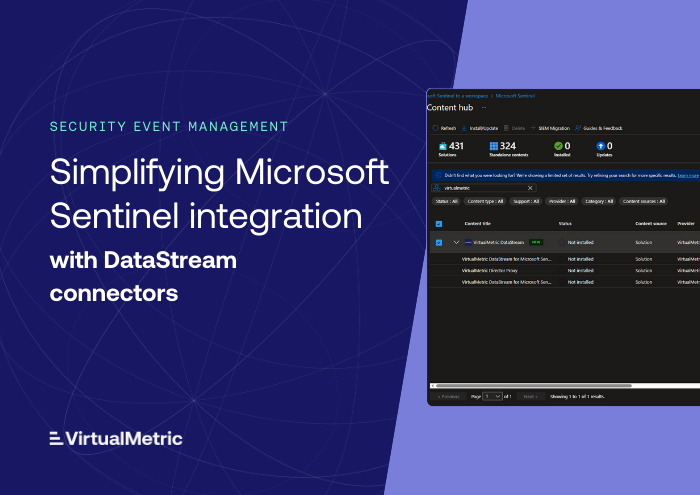
- Browse Content Hub: Open Microsoft Sentinel portal, navigate to Content Hub
- Search & install: Find “VirtualMetric DataStream” and click Install
- Choose connector: Select the appropriate connector for your use case
- Configure settings: Provide workspace details and authentication method
- Deploy: Connector automatically provisions DCE, DCR, and tables
- Start ingesting: Begin sending data immediately
Advanced configuration (optional):
- Customize ASIM mappings for specific log sources
- Configure cost optimization rules and filters
- Set up data routing policies for workspace vs. data lake
- Define schema validation rules and drift detection
ASIM compliance & Security Copilot readiness
All VirtualMetric DataStream connectors ensure ASIM compliance, which is critical for maximizing your Microsoft Security investment. This ensures Content Hub solutions, rules, and Copilot prompts work as intended from the beginning.
Security Copilot benefits:
- AI-powered threat detection works optimally with ASIM-normalized data
- Natural language queries leverage standardized field names
- Automated investigation recommendations rely on consistent schemas
- Cross-product correlation (Defender, Sentinel, Entra) requires ASIM
Analytics rule compatibility:
- Pre-built Sentinel detection rules function correctly
- Custom analytics rules work across diverse log sources
- Workbooks and dashboards display data consistently
- Hunting queries return accurate results
Putting it all together:
VirtualMetric DataStream’s availability in Microsoft Sentinel Content Hub enables teams to deploy normalized, cost-optimized data ingestion without manually creating DCRs or managing ingestion credentials. With three connectors supporting standard tables, data lake routing, and managed identity–based architectures, organizations can improve data quality, control ingestion costs, and strengthen security across diverse Sentinel deployments.
To get started, open Microsoft Sentinel, navigate to Content Hub, search for VirtualMetric DataStream, and install the connector that best fits your environment.
See VirtualMetric DataStream in action

Start for free to experience safer, smarter data routing with full visibility and control.
Related content
Security Event Management
Sanctioned Isn't Secured: The AI Audit Logs Your SIEM Never Sees
Security Event Management
Microsoft Sentinel Cost Optimization with Staged Routes and Commit Processors
Security Event Management

How to Reduce SIEM Costs Without Losing Security Visibility
Security Event Management